 B2BROKER
 B2CORE
 B2CORE IB
 B2TRADER
 B2CONNECT
 B2TRANSLATE
 B2BROKER
如何在客户入金时自动入账奖金
了解如何根据预定义的设置和预设配置自动入金奖金,以便向客户入账其入金金额的一定比例
您可以在客户向其交易账户入金时自动向其入账奖金。在这种情况下,奖金金额将按入金金额的一定百分比计算。有关向客户发放奖金的流程详情,请参阅奖金简介。
要配置入金时自动入账奖金:
- 在 System > Settings 页面上配置自动入账奖金的设置(请按照下列步骤操作)。
- 为每个您希望在入金时自动入账奖金的交易平台创建一个奖金预设。为特定平台创建的预设必须具有最低优先级索引,才能用于自动奖金(详情请参阅如何创建奖金预设)。
如果特定交易平台没有预设,则不会向该平台上的客户交易账户自动入账奖金。
如果用于自动奖金的预设应用了任何限制,则仅会向满足限制条件的客户入账奖金。
要配置入金时自动入账奖金的设置:
导航至 System > Settings。
在 Bonuses 部分中,指定以下设置:
- 将 Autocreate from deposit 设置为 Enabled。
- 在 Autocreated bonus percent 字段中,输入您希望作为奖金入账给客户的入金金额百分比。
- 在 Auto Bonus Limit 字段中,指定可自动入账至客户交易账户的最高奖金金额。如果计算出的奖金金额超过此限额,则仅会入账允许的最高金额。
- 在 Auto Bonus Minimum 字段中,指定客户必须向其交易账户入金或转账的最低金额,以便针对每笔操作触发自动奖金入账。此最低金额与客户入金总额无关。
- 在 Enable "Burn if Equity < Credit" 下拉列表中,选择您希望启用以下功能的平台:如果账户净值低于已入账的奖金金额,则扣除奖金信用额度。
此选项可用于 MT4/5,不支持 cTrader。
- 将 Burn on Withdrawal 选项设置为 Enabled,以便在客户从其交易账户出金时扣除奖金信用额度。
点击 Save 以应用更改。
示例
本示例根据 System > Settings 页面上配置的设置以及名为 MT4 的奖金预设,说明如何解读入金时自动入账奖金的要求:
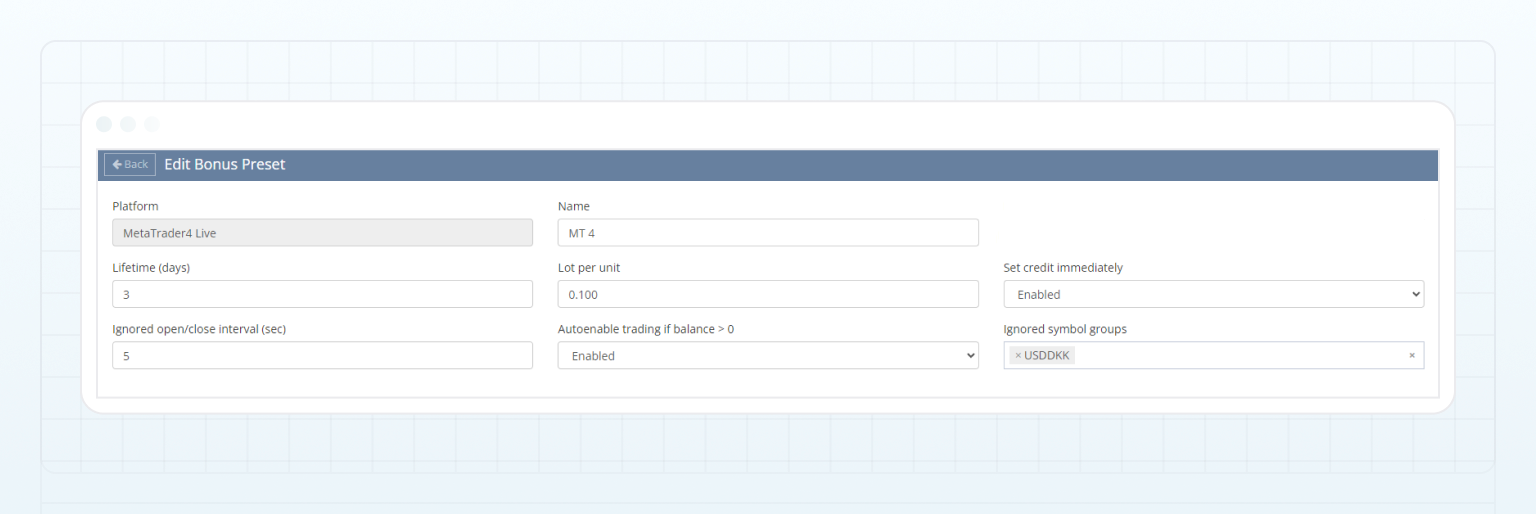
假设客户向其在 MetaTrader4 Live 平台上开立的交易账户入金。鉴于 Autocreate from deposit 已设置为 Enabled,且 MetaTrader4 Live 的奖金预设可在 Bonus presets 页面上使用,该客户有资格获得入金奖金。获得奖金的要求如下所述:
| Bonus setting | Description |
|---|---|
| Autocreated bonus percent = 10 |
Indicates that 10% of a deposited amount can be received by a client as a bonus. For example, if a client deposits 300 USD to their trading account, the client can receive a bonus of 10% of 300 USD, which is 30 USD. |
| Auto Bonus Minimum = 100 |
Indicates that a client must deposit a minimum of 101 USD to their trading account to be able to receive the bonus. In this example, the client deposited 300 USD that meets the given requirement. |
| Auto Bonus Limit = 500 |
Indicates that the maximum bonus amount cannot exceed 500 USD. In this example, the calculated bonus amount is 30 USD, so the full bonus of 30 USD is added to the client trading account as credit. |
| Set credit immediately = Enabled | Indicates that after depositing funds, the bonus amount is immediately added to the client trading account as credit, without waiting for the completion of any other bonus program on that account. |
| Lot per unit = 0.1 | This setting is applied to the calculated bonus amount to determine the volume that must be traded by the client:
Required volume = Bonus amount / Lot per unit = 30 / 0.1 = 3 lots
|
| Lifetime (days) = 3 |
To receive the bonus credit on the account balance, the client must trade the required volume within 3 days after the bonus credit is added to their trading account. The traded volume is calculated based on the volume of closed positions. Moreover, these positions must be opened after the bonus is credited to the client account. For example, if the client opens a position, then deposits funds and receives the bonus credit, and subsequently closes the position, the volume of that closed position won’t contribute to the required traded volume. |
| Ignored open/close interval (sec) = 5 | The client must keep positions open for at least 5 seconds for them to be counted towards the required traded volume. |
| Ignored symbol groups = USDDKK | If the client trades the symbols from the selected group, the volume of these trades isn’t counted towards the required traded volume. |
| Burn if Equity < Credit | Indicates that if the account equity becomes less than the credited bonus, the bonus credit of 30 USD will burn. |
| Burn on Withdrawal = Disabled | Indicates that withdrawals from the client trading account doesn’t cause burning of the bonus credit. |
最后更新于