 B2BROKER
 B2CORE
 B2CORE IB
 B2TRADER
 B2CONNECT
 B2TRANSLATE
 B2BROKER
如何创建临时奖金计划
了解如何在 B2CORE UI 中创建供客户领取的临时奖金计划,并自定义交易条件、到期时间和入账选项
您可以在 Back Office 创建临时奖金计划。创建奖金计划后,该计划会立即显示在 B2CORE UI 的 Bonuses 页面上,客户即可从该计划中领取奖金。
要创建临时奖金计划:
导航至 Bonuses > Temporary Bonuses。
点击 Create,然后选择要为其创建奖金计划的交易平台。
在 Create Temporary Bonus 页面上,填写以下字段:
-
在 Name 字段中,输入奖金计划的名称,该名称将显示给 B2CORE UI 中的客户。
-
在 Amount 字段中,指定奖金金额。
-
在 Currency 下拉列表中,选择奖金计划的币种。只有以所选币种计价的交易账户才能用于领取该计划中的奖金。
-
在 Expired 字段中,设置奖金计划的结束日期和时间。
-
在 Platform Groups 中,选择在交易平台上创建的一个或多个组;这些组中的交易将计入奖金计划的交易量。
-
在 Preset 下拉列表中,您可以选择一个预设,以根据预设设置自动填写其余字段。
或者,您可以将 Preset 字段留空,并手动填写其余字段:
-
在 Lifetime (days) 字段中,输入客户必须完成所需交易量的期限(以天为单位)。
-
在 Lot per unit 字段中,输入用于确定客户必须交易的交易量的比率。
该比率将应用于指定的奖金金额,所需交易量计算如下:
Required volume = Bonus amount / Lot per unit -
在 Set credit immediately 中,选择以下两个值之一:
- Enabled — 当客户使用同一交易账户一次从多个计划中领取奖金时,所有已领取的奖金会立即作为信用额度添加到其账户中,使客户能够使用信用资金进行交易。
- Disabled — 当客户使用同一交易账户一次从多个计划中领取奖金时,已领取的奖金会依次添加到其交易账户中。只有在第一个已领取的奖金处理完成并被分配最终状态(
Completed或Expired)后,第二个已领取的奖金才会作为信用额度添加到客户交易账户中,依此类推。
-
在 Ignored open/close interval (sec) 字段中,指定客户必须保持仓位开启的最短时长(以秒为单位),达到该时长的仓位才会计入奖金计划的交易量。
-
在 Autoenable trading if balance > 0 下拉列表中,选择以下两个值之一:
- Enabled — 当账户余额从零或负数变为正数时,账户的
Trade Enabled权限会自动恢复,使客户能够继续在其账户上交易,包括使用奖金信用额度。 - Disabled — 当账户余额从零或负数变为正数时,账户的
Trade Enabled权限不会自动恢复。
- Enabled — 当账户余额从零或负数变为正数时,账户的
-
在 Ignored symbol groups 下拉列表中,选择一个或多个交易不会计入奖金计划交易量的品种组。
对于 cTrader,即使 cTrader 平台提供品种组,也必须在此字段中选择单个品种,而非品种组。
您可以将此字段留空。
点击 Save 创建奖金计划。
创建的奖金计划现在会列在 B2CORE UI 的 Bonuses 页面上。
示例
本示例说明如何理解具有以下设置的临时奖金计划要求:
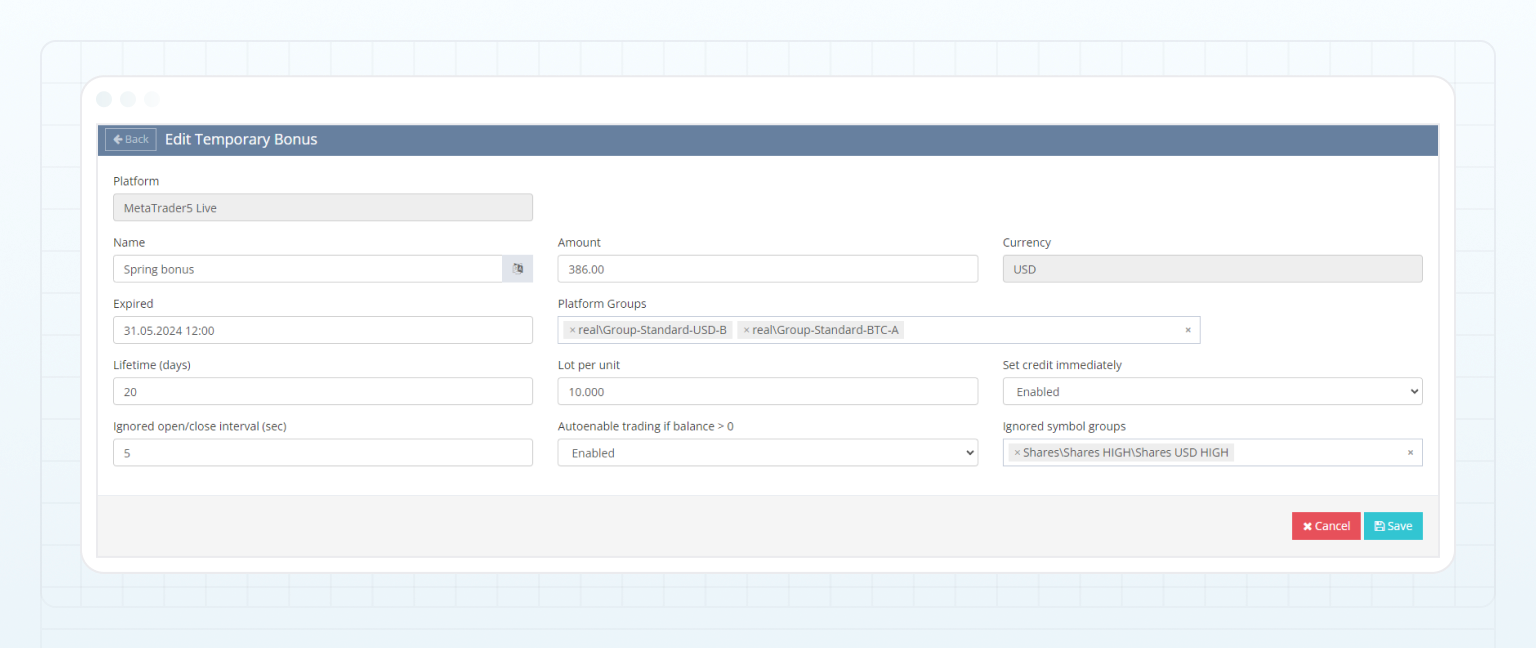
要从该奖金计划中获得 386 USD 的奖金金额,客户需要使用其在 MetaTrader 5 Live 平台上开设且以 USD 计价的活跃交易账户,在 B2CORE UI 中领取奖金。
领取奖金后,奖金将作为信用额度添加到客户交易账户中,使客户能够使用信用资金进行交易。要在账户余额中获得奖金信用额度,客户必须满足以下奖金计划要求:
| Program setting | Description |
|---|---|
| Amount = 386 and Lot per unit = 10 | Both settings are used to determine the volume that must be traded by the client: Required volume = Amount / Lot per unit = 386 / 10 = 38,6 lots |
| Lifetime (days) = 20 | To receive the bonus credit on the account balance, the client must trade the required volume within 20 days after the bonus credit is added to their trading account. The traded volume is calculated based on the volume of closed positions. Moreover, these positions must be opened after claiming the bonus and receiving it as credit, and they must be closed before the end of the bonus program. For example, if the client opens a position, then claims and receives the bonus as credit from the given program, and subsequently closes the position, the volume of that closed position won’t contribute to the traded volume of the bonus program. |
| Platform Groups = real/Group-Standard-USD-B, real/Group-Standard-BTC-A | Only the volume of trades made in the selected groups are counted towards the traded volume of the bonus program. |
| Ignored open/close interval (sec) = 5 | The client must keep positions open for at least 5 seconds for them to be counted towards the traded volume of the bonus program. |
| Ignored symbol groups = Shares/Shares HIGH/Shares USD HIGH | If the client trades the symbols from the selected group, the volume of these trades isn’t counted towards the traded volume of the bonus program. |
| Set credit immediately = Enabled | Indicates that after claiming the bonus, the bonus amount of 386 USD is immediately added to the client trading account as credit without waiting for the completion of any other bonus program on that account. |
| Autoenable trading if balance > 0 = Enabled | Indicates that if the account balance changes from zero or negative to positive, the permission to trade on the account is automatically restored. |
如何限制临时奖金计划的使用
您可以根据客户的国家/地区、客户类型、验证级别、司法管辖区或介绍经纪人 (IB) 限制临时奖金计划的使用。此外,您还可以组合使用这些限制条件,以实现更精细的访问控制。
如果客户不符合限制条件,临时奖金计划将不会在 B2CORE UI 中向该客户显示,客户也无法选择领取该奖金。
要限制临时奖金计划的使用:
导航至 Bonuses > Temporary Bonuses。
选择奖金计划,然后点击该计划行中的 Edit 按钮。
点击页面右上角的 Actions,然后选择限制类型:
- Country restrictions — 使该计划仅面向特定国家/地区的客户提供。
- Client type restrictions — 使该计划仅面向所选类型的客户提供,例如 Corporate 或 Individual。
- Verification level restrictions — 使该计划仅面向具有特定验证级别的客户提供。
- Jurisdiction restrictions — 使该计划仅面向所选司法管辖区内的客户提供。
- Introducing broker restrictions — 使该计划仅面向由指定 IB 推荐的客户提供。
在 Restrictions 弹出窗口中,填写以下信息:
- 在 Enabled 下拉列表中,选择 Yes。
- 在 Type 下拉列表中,选择以下两个选项之一:
- Deny only — 此选项会阻止符合所选规则的客户在 B2CORE UI 中查看和订阅该奖金计划。
- Allow only — 此选项仅允许符合所选规则的客户在 B2CORE UI 中查看和订阅该奖金计划。
- 在 Rules 下拉列表中,根据您应用的限制类型,选择一个或多个定义限制条件的值,例如国家/地区、客户类型、验证级别、司法管辖区或 IB。
点击 Save 应用更改。
临时奖金计划现在已应用使用限制。
最后更新于